- Version
- v2.9.0
- License
- MIT licensed
- Platforms
- macOS · Linux · Win
- Cost
- $0 / month
// local-first wordpress tooling
Your machine does the work.
WordPress just syncs.
Optimize images, strip backgrounds, generate metadata, audit accessibility, and undo any change. It all runs on your own laptop, then pushes to any WordPress site over the REST API. No cloud SaaS, no per-image credits, no plugin.
brew install gfargo/tap/localpress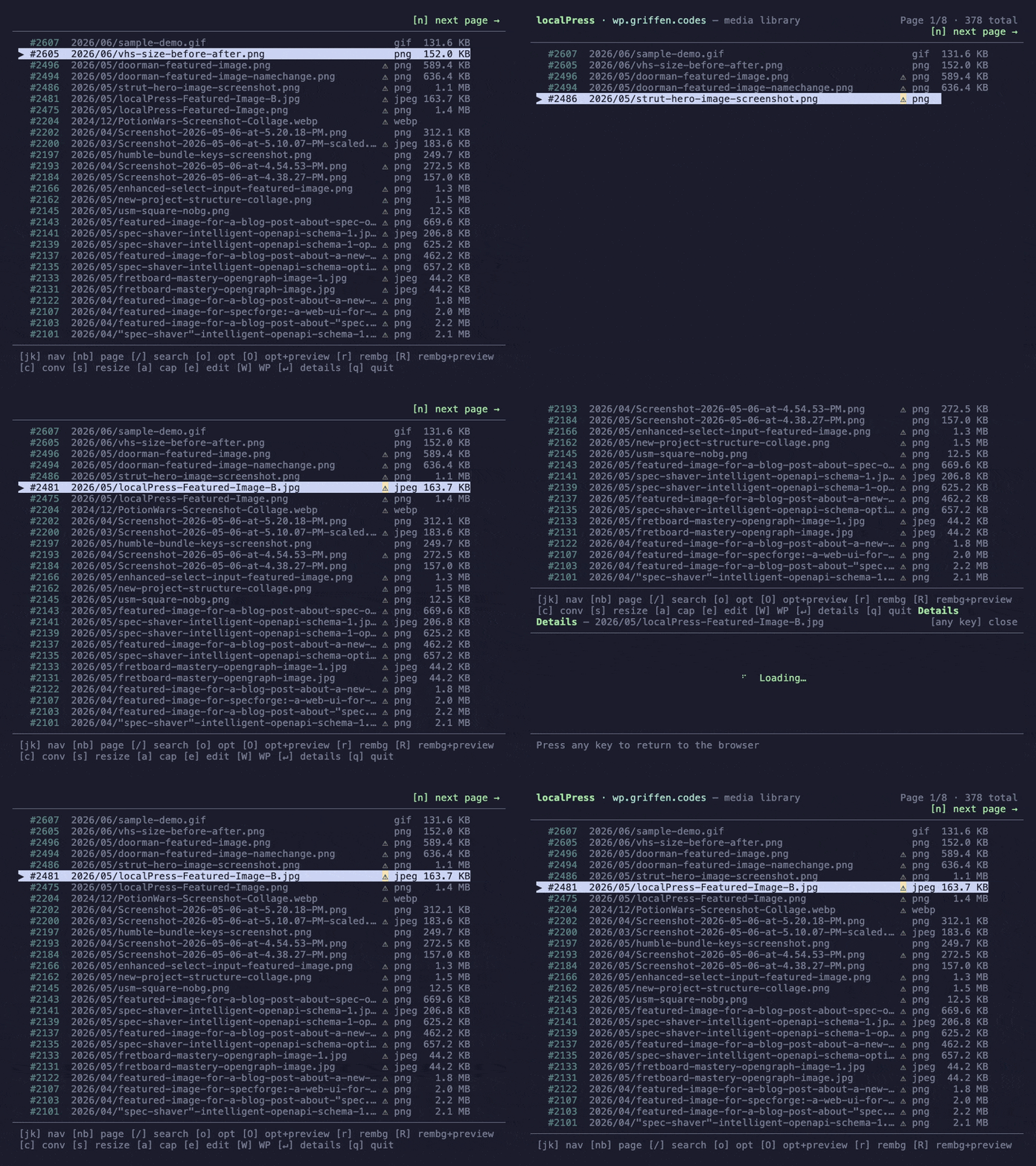
// see it in action
A full media manager, in your terminal.
localpress list -i
Browse, inspect, and act on your media library without leaving the terminal.
// keyboard-driven overlays · every action one keystroke away
[o] optimize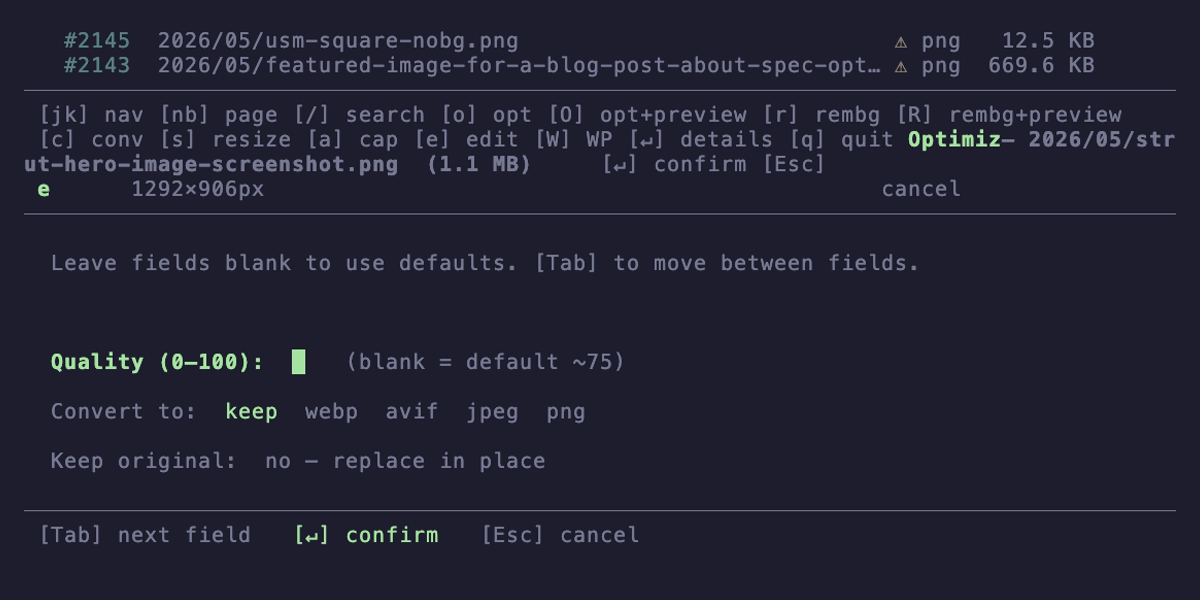
Inline optimize · quality, format, replace mode
[/] search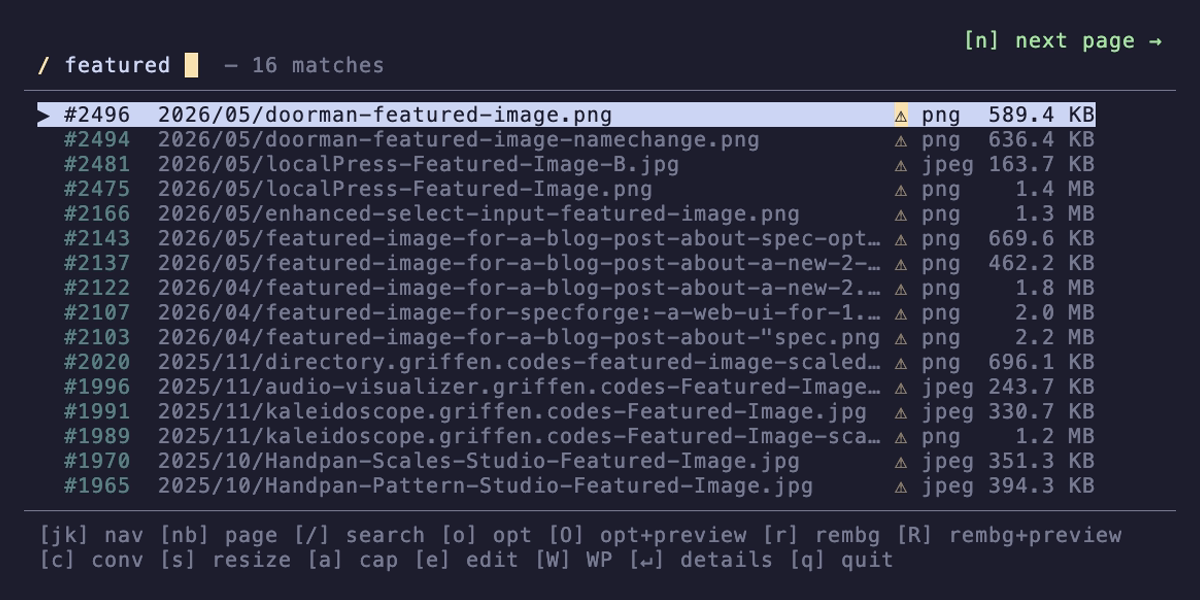
Live search filters as you type
[c] convert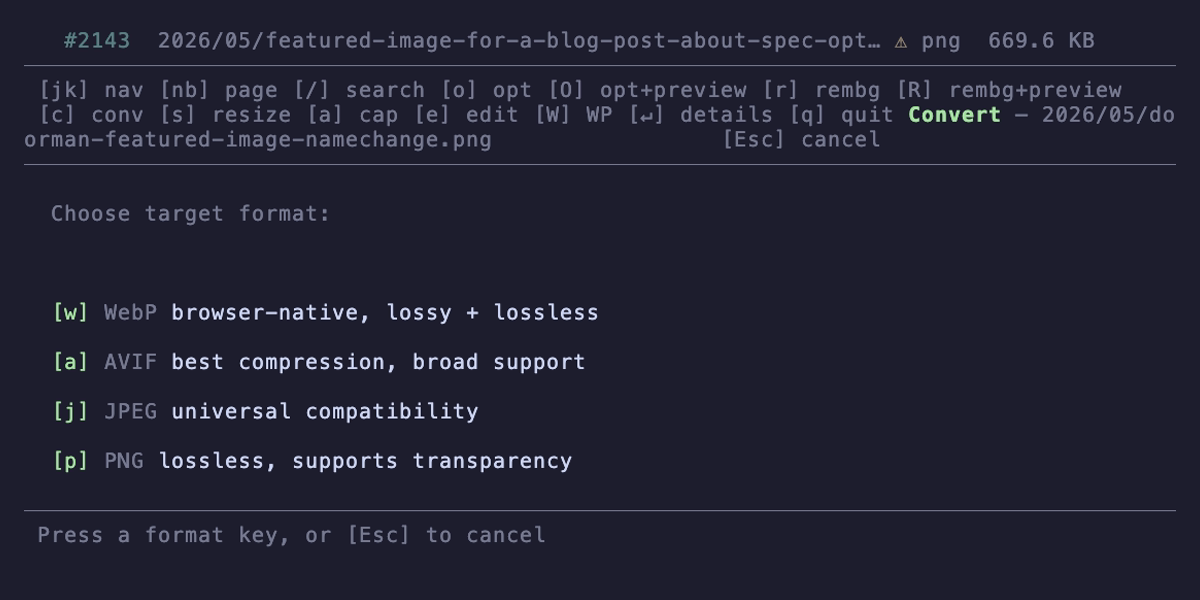
Format picker · WebP, AVIF, JPEG, PNG
[↵] details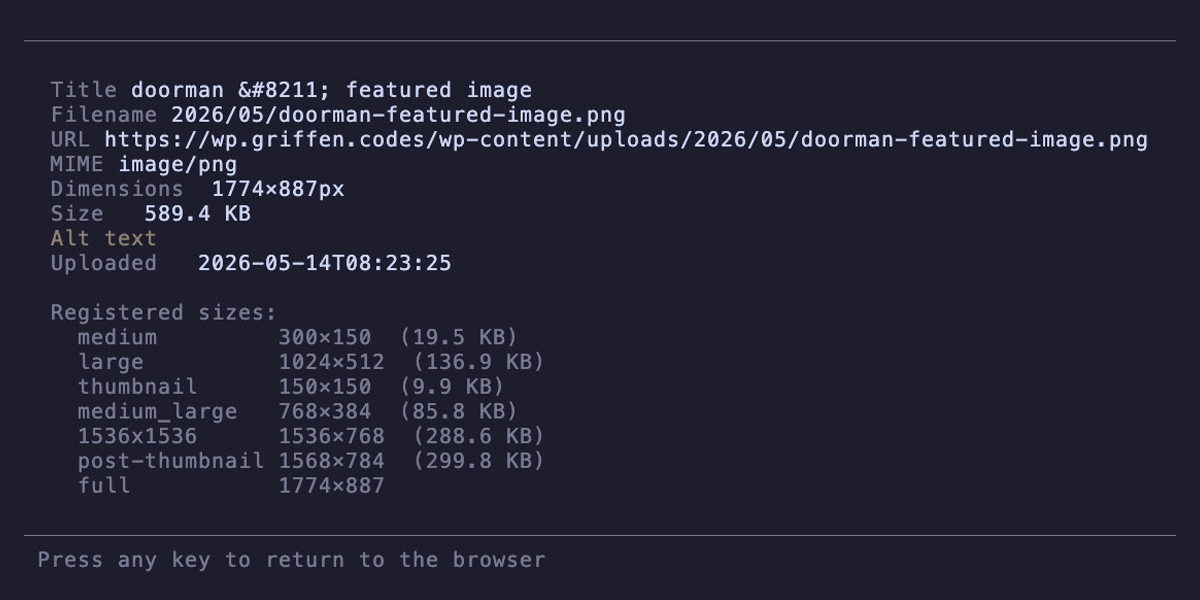
Full metadata detail view
// workflows, not screenshots
actions tour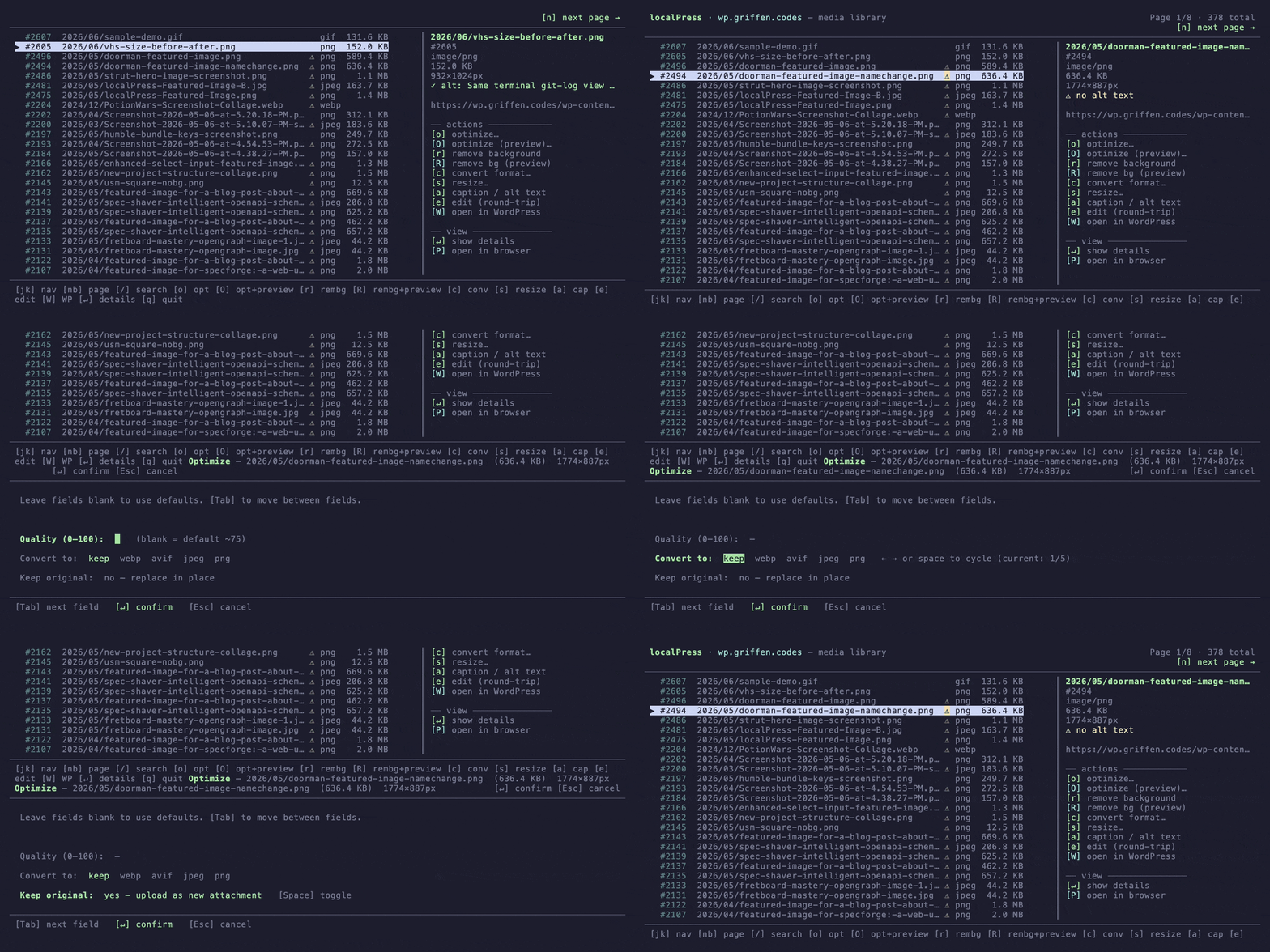
Every action one keystroke away · optimize, convert, resize
full workflow
doctor → list → stats · the full localpress loop
// what's inside
38 commands. One binary.
One image or your whole library, the processing stays on your machine. Bulk writes dry-run by default, and shared concurrency keeps batches predictable.
optimizeCompress without compromise
sharp + jSquash WASM codecs. Set a quality floor, pick a format, use named profiles, preview in the browser with --preview, or process your entire library in one pass.
remove-bgBackground removal. No cloud.
Five checksum-verified ONNX models, including BiRefNet, all running on your hardware. Preview first; batch runs reuse one loaded model session.
auditSeven health checks, one command
Unoptimized, oversized, missing alt text, display-size mismatch, duplicate images, broken refs, orphaned files. Every check runs in seconds.
export / importMigrationBackup, migrate, bulk-load.
Export your entire library as a ZIP with metadata manifest. Import directories or ZIPs with optional optimization on upload.
watchAutomationDrop files. They appear in WordPress.
Watch a local directory for new or changed images, including atomic editor saves, then optimize and push continuously.
editRound-tripOpen in any editor. Syncs back.
Download → GIMP, Photoshop, or Preview → save → automatically pushed to WordPress.
referencesDiscoveryFind every usage
Scan all posts for an attachment's URL. Rewrite them in-place after a rename or move.
// also included
initInteractive site wizardsitesManage multiple sitesdoctorCapability check + --fixconfigProfiles + scalar valueslistBrowse media libraryshowAttachment metadatastatsLibrary health dashboardcaptionAI alt-text via OllamaconvertJPEG → WebP → AVIFresizeResize preserving ratioregenerateRebuild WP thumbnailsexportBackup as ZIP or dirimportBulk upload with optimizepostsContent CRUDa11yWCAG accessibility auditpullDownload to local diskpushUpload + replace-in-placeupdateSelf-update localpresscompletionsbash / zsh / fish// localpress audit
Seven health checks in a single pass.
01 --unoptimizedImages never processed by localPress02 --largeImages over a size threshold (default 1 MB)03 --missing-altImages without alt text (accessibility / SEO)04 --display-sizeImages larger than their biggest registered thumbnail05 --duplicatesPerceptually identical images via dHash06 --broken-refsAttachment URLs that return 40407 --orphansFiles on disk with no DB record (requires WP-CLI)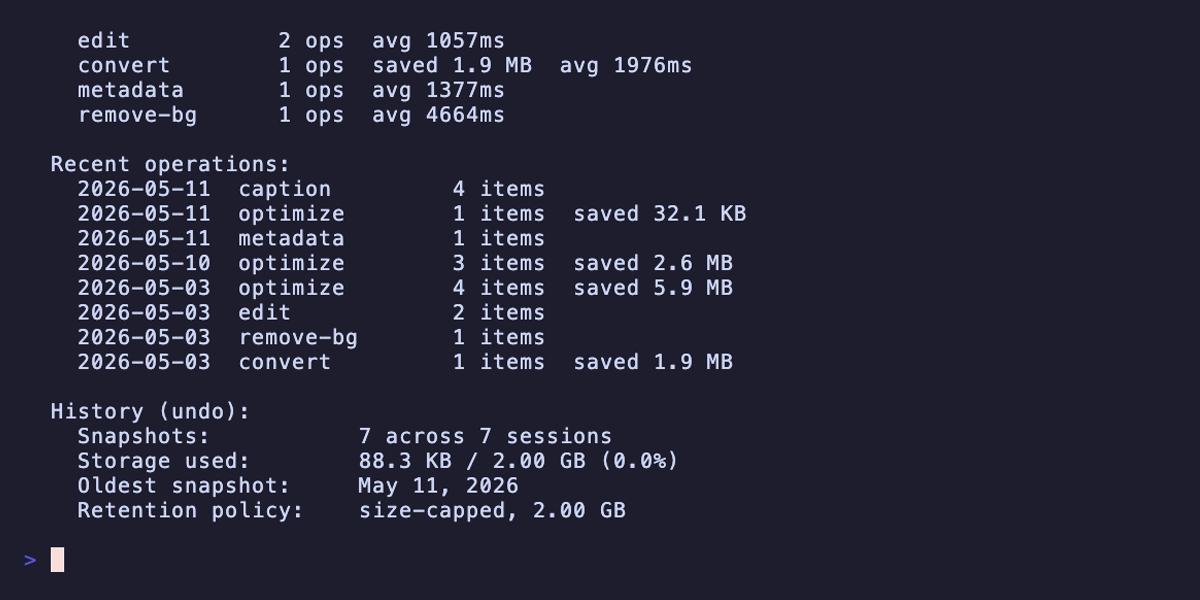
// vision ai
Six fields, one vision model.
The same local Ollama vision model that powers caption now generates titles, descriptions, tags, image-type classifications, and AI-renamed slugs. Each is its own command, or run them all at once with vision.
localpress altAlt text
Concise single-sentence description for accessibility. Writes to alt_text.
localpress titleTitle
3-7 word noun phrase. Auto-detects machine-generated names (Screenshot-…, IMG_…) for bulk cleanup.
localpress describeDescription
2-3 sentence description for galleries and attachment-page SEO. Writes to the description field.
localpress tagTags
3-6 short tags appended to the caption as a [tags: …] block. Works everywhere, no taxonomy plugin needed.
localpress classifyType
Detects screenshot/photo/illustration/diagram. Cached locally so optimize picks PNG vs WebP automatically.
localpress renameSlug
AI-generated permalink slug (with --smart) or explicit (--to). Straight talk on the file URL: slug only for v1.
// or · all at once
The vision workflow
localpress vision <id> runs all five generators in one pass. Print-only by default so you can review before writing. Pair with --apply to commit everything to WordPress in a single composed update.
localPress caches the classification locally, so later optimize calls on the same attachment pick PNG for screenshots and WebP for photos on their own.
# Print all five fields for review
localpress vision 2202

# Or write them all back at once
localpress vision 2202 --apply

# Or pick a subset
localpress vision 2202 --fields alt,title --apply// time-machine
Reversible by design.
Source and metadata changes write a snapshot before WordPress mutates. Explicit keep-original runs skip needless snapshots; automatic REST fallbacks retain recovery history. Wrong bulk optimize or bad cutout? Walk it back.
Run anything
Optimize, convert, resize, remove-bg, caption, in bulk or one at a time. Before any source or metadata write, localpress captures the state needed to recover it.
localpress optimize --unoptimized --applyBrowse history
Every command creates a session. Inspect snapshots with history, or drop into the interactive TUI to walk through them.
localpress history -iUndo the bad one
Dry-run first, apply when ready. Single attachment, whole session, or step back op-by-op. Works the same when an MCP agent drives it.
localpress undo --applyBulk undos dry-run unless you pass --apply, matching the rest of the CLI.
Default 2 GB cap per site. Auto-prune on every op. Configurable via history.maxSizeBytes.
Skipped ops (source unchanged) don't create snapshots. Re-running unchanged ops costs nothing.
Agents get undo, history_list, history_show, and history_prune as typed tools.
// agent-native
Built for AI agents.
Drop one config block into Claude Desktop, Cursor, Kiro, or any MCP client. 52 typed tools cover every operation, including bulk optimization and accessibility audits. Same binary, new entrypoint. Now an agent can run your whole media library on its own.
{
  "mcpServers": {
    "localpress": {
      "command": "localpress",
      "args": ["mcp"]
    }
  }
}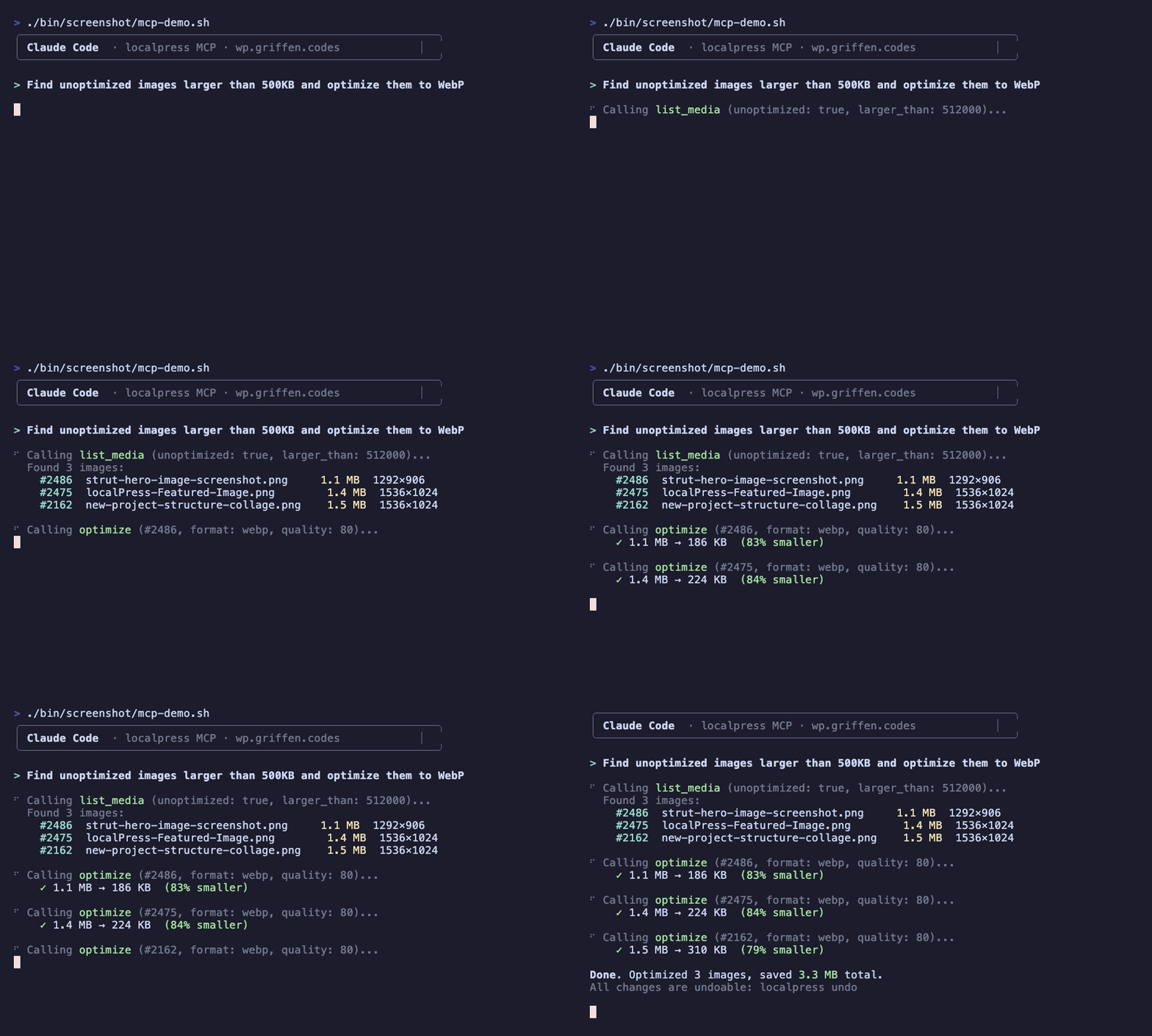
An AI agent finds unoptimized images and compresses them, no manual commands needed.
- sites_list
- sites_use
- sites_add
- sites_remove
- doctor
- health_check
- config_*
- list
- show
- stats
- audit
- references
- search_by_url
- site_briefing
- watch_status
- posts_list
- posts_show
- posts_create
- posts_update
- posts_delete
- a11y_audit
- caption
- generate_title
- generate_description
- tag
- classify
- vision
- optimize
- convert
- resize
- remove_bg
- update_metadata
- pull
- push
- delete
- rename
- regenerate
- export
- import
- history_list
- history_show
- history_prune
- undo
localpress://siteslocalpress://statslocalpress://capabilitieslocalpress://history// the full picture
How localPress stacks up.
Feature by feature against five WordPress image optimization plugins you already know.
| Feature | localPress | EWWW | ShortPixel | Smush | Imagify |
|---|---|---|---|---|---|
| Processing location | Your laptop | WP server | Cloud | Cloud | Cloud |
| Recurring cost | $0 | $0 – $25/mo | $4 – $10/mo | $3 – $13/mo | $6 – $12/mo |
| Works on shared host | ✓ | Needs exec() | ✓ | ✓ | ✓ |
| AI background removal | ✓ local | ✗ | ✓ paid | ✗ | ✗ |
| Desktop editor round-trip | ✓ | ✗ | ✗ | ✗ | ✗ |
| AI agent skill | ✓ | ✗ | ✗ | ✗ | ✗ |
| License | MIT | GPLv3 | Proprietary | Mixed | Proprietary |
§ 09 / Installation
Three ways in.
One binary. No runtime to babysit, no daemon in the background. Pick a lane and ship.
brew install gfargo/tap/localpressArchive download
Pre-built tarballs for macOS (arm64, x64), Linux (arm64, x64), Windows (x64). Requires Bun ≥ 1.1.
git clone https://github.com/gfargo/localpress.gitcd localpress && bun installbun run build